Front-end Web Development/Notes: Difference between revisions
JeffreyATW (talk | contribs) No edit summary |
JeffreyATW (talk | contribs) No edit summary |
||
| (48 intermediate revisions by 2 users not shown) | |||
| Line 1: | Line 1: | ||
Notes from previous [[Front-end Web Development]] classes. | Notes from previous [[Front-end Web Development]] classes. | ||
==== Class for | ==== Class for 2016-12-19: back-end web development ==== | ||
This class is all about the seedy underbelly of web development: the backend! | This class is all about the seedy underbelly of web development: the backend! It is tailored toward front-end developers wanting to get a taste of how things come together on the server. We'll talk about PHP, then Node, then Rails. | ||
During the recap period, we will set up your computers. But it's best to do this before arriving if possible. Here are the steps used for class preparation: | During the recap period, we will set up your computers. But it's best to do this before arriving if possible. Here are the steps used for class preparation: | ||
| Line 16: | Line 14: | ||
If you would like to follow along, the easiest option is to run a virtual machine. | If you would like to follow along, the easiest option is to run a virtual machine. | ||
* Install [https://www.virtualbox.org/wiki/Downloads VirtualBox AND the Extension Pack] | * Install [https://www.virtualbox.org/wiki/Downloads VirtualBox AND the Extension Pack] | ||
* [http://jeffreyatw.com/static/frontend | * [http://jeffreyatw.com/static/frontend/Ubuntu.ova Download this preconfigured Ubuntu virtual machine (2.89GB)] | ||
* Double-click the .ova file. You should check the "reinitialize the MAC address" step. | * Double-click the .ova file. You should check the "reinitialize the MAC address" step. | ||
* Start the machine after installation and you're all set! | * Start the machine after installation and you're all set! | ||
| Line 25: | Line 23: | ||
====== Linux ====== | ====== Linux ====== | ||
* Install required packages: <code>sudo apt-get install nodejs | * To set up Node.js installation, run: | ||
** <code>curl -sL https://deb.nodesource.com/setup_7.x | sudo -E bash -</code> | |||
* Install required packages: <code>sudo apt-get install -y nodejs lamp-server^ ruby ruby-dev zlib1g-dev libsqlite3-dev</code> | |||
** (Press Enter at any prompts.) | ** (Press Enter at any prompts.) | ||
* Install Express: <code>sudo npm install -g express-generator</code> | * Install Express: <code>sudo npm install -g express-generator</code> | ||
| Line 31: | Line 31: | ||
====== OS X ====== | ====== OS X ====== | ||
* Upgrade to at least OS X 10.9, preferably the latest (currently | * Upgrade to at least OS X 10.9, preferably the latest (currently macOS Sierra). | ||
* Install the Xcode developer tools: | * Install the Xcode developer tools: | ||
** <code>xcode-select --install</code> | ** <code>xcode-select --install</code> | ||
| Line 59: | Line 59: | ||
* For PHP: | * For PHP: | ||
** Install the Visual C++ 2012 Redistributable: https://www.microsoft.com/en-us/download/details.aspx?id=30679 | ** Install the Visual C++ 2012 Redistributable: https://www.microsoft.com/en-us/download/details.aspx?id=30679 | ||
** Install | ** Install WampServer: http://www.wampserver.com/en/ | ||
===== THE HARDEST WAY ===== | ===== THE HARDEST WAY ===== | ||
Install Node.JS, NPM, Express, Apache, PHP, Ruby, and Rails individually. Good luck! | Install Node.JS, NPM, Express, Apache, PHP, Ruby, and Rails individually. Good luck! | ||
[https://www.youtube.com/watch?v= | [https://www.youtube.com/watch?v=tXuMqubHN8w Lecture video] | ||
==== Class for | ==== Class for 2016-12-12: Working from professional mockups, cont'd ==== | ||
We will continue working off of | We will continue working off of our mockup and apply responsive code in the process. | ||
[https://github.com/JeffreyATW/noiseco Mockups and assets can be found here]. | |||
[https://github.com/JeffreyATW/ | |||
[https://www.youtube.com/watch?v=obzIeM1-qZg Lecture video]<br> | |||
[https://github.com/JeffreyATW/fwd/tree/master/series10/class18 Lecture materials] | |||
==== Class for 2016-12-05: Working from professional mockups ==== | |||
We'll take the knowledge we gained from looking at the box model, positioning, media queries and CSS3, and work off of a mockup to make a site that could pass as a professional design. | |||
[https://github.com/JeffreyATW/noiseco Mockups and assets can be found here]. | |||
[https://github.com/JeffreyATW/ | |||
This class will require the use of [https://harpjs.com/ Harp], a static web server, as we'd like to make this as realistic of a project as possible. As a bonus, we'll learn how to use preprocessors like [http://sass-lang.com/ Sass] to help us with our code. | |||
[https://www.youtube.com/watch?v=sKIoZwgkFo4 Lecture video]<br> | |||
[https://github.com/JeffreyATW/fwd/tree/master/series10/class18 Lecture materials] | |||
==== Class for 2016-11-28: Modern CSS ==== | |||
We'll talk about a number of topics concerning modern CSS development: CSS3, browser support, BEM, and responsive design (for mobile devices). | |||
We'll start on [http://jeffreyatw.com/static/frontend/series6/class17/blog.zip this multi-column page] and make it work on mobile. | |||
[https://www.youtube.com/watch?v= | [https://www.youtube.com/watch?v=YOCckaqAT1E Lecture video]<br> | ||
[https://github.com/JeffreyATW/fwd/tree/master/ | [https://github.com/JeffreyATW/fwd/tree/master/series10/class17 Lecture materials] | ||
==== Class for | ==== Class for 2016-11-14: CSS positioning ==== | ||
We | We'll focus on positioning of elements: using absolute, relative, or fixed positioning to put the elements anywhere we want on the whole page. We'll use [http://jeffreyatw.com/static/frontend/series6/class4/mockup.png this mockup] along with [http://jeffreyatw.com/static/frontend/series6/class4/assets.zip these assets] to put together a page that demonstrates positioning. | ||
[https://www.youtube.com/watch?v=LvXiyXpXjS0 Lecture video] (no recap)<br> | |||
[https://github.com/JeffreyATW/fwd/tree/master/series10/class16 Lecture materials] | |||
==== Class for 2016-11-07: CSS floats & flexbox ==== | |||
[ | Floating and flexbox are two methods behind creating websites with multiple columns, navigation menus, and basically any block element that's stacked horizontally. We'll learn about them by taking a look at some examples, discuss the pros and cons of each, then take a [http://jeffreyatw.com/static/frontend/series2/class4/mockup.png mockup] and create a site from it. | ||
= | [https://www.youtube.com/watch?v=sWQXTf-zvNA Lecture video]<br> | ||
[https://github.com/JeffreyATW/fwd/tree/master/series10/class15 Lecture materials] | |||
==== Class for 2016-10-24: Redux ==== | |||
We took a look at [https://facebook.github.io/react/ React] last week. There are a few aspects that we could probably optimize, by reducing the amount of props passed between components, and the amount of unnecessary renders. [http://redux.js.org/ Redux] will help us achieve that goal. We'll continue working on the [https://github.com/JeffreyATW/fwd/tree/master/series10/class13/noisetwitter React app] we made last week. | |||
[https:// | To prepare, make sure you have the current version ("Latest Features") of [https://nodejs.org Node.js] installed. | ||
[https://www.youtube.com/watch?v=NN82tjV7Wzo Lecture video] (no sound until the half hour mark)<br> | |||
[https://github.com/JeffreyATW/fwd/tree/master/series10/class14 Lecture materials] | |||
We'll | ==== Class for 2016-10-17: React ==== | ||
[https://facebook.github.io/react/ React] is a JavaScript UI library that's skyrocketing in popularity. We'll take the [https://github.com/JeffreyATW/fwd/tree/master/series10/class10 NoiseTwitter] app we've made in jQuery and Angular and do it again in React, with the help of [https://github.com/facebookincubator/create-react-app Create React App] which will propel us into a modern JavaScript development environment. This class is an intro on just plain React in the DOM, but the next class will add in additional libraries like [http://redux.js.org/ Redux], [https://github.com/paularmstrong/normalizr Normalizr], and possibly [https://github.com/reactjs/reselect Reselect]. | |||
[https:// | To prepare, make sure you have the current version ("Latest Features") of [https://nodejs.org Node.js] installed. | ||
[https://www.youtube.com/watch?v=Y2Wd6zf7r3c Lecture video]<br> | |||
[https://github.com/JeffreyATW/fwd/tree/master/series10/class13 Lecture materials] | |||
[https:// | ==== Class for 2016-10-10: AngularJS ==== | ||
[https://github.com/JeffreyATW/fwd/tree/master/ | We'll learn about the basics of [https://angularjs.org/ AngularJS] (version 1), a popular client-side MVC application framework. Frameworks such as these make it easier to manage data-rich views by keeping everything in sync with each other. To understand how libraries like AngularJS differ from [http://jquery.com jQuery], we'll be taking our [https://github.com/JeffreyATW/fwd/tree/master/series10/class10 NoiseTwitter] app and converting it from one that uses jQuery into one that uses AngularJS instead. | ||
= | [https://www.youtube.com/watch?v=TcyRaDiX-yM Lecture video]<br> | ||
[https://github.com/JeffreyATW/fwd/tree/master/series10/class12 Lecture materials] | |||
==== Class for 2016-10-03: Forms ==== | |||
[ | We'll create a Foundation-based landing page with a sign-up form. We'll learn about built-in HTML5 validation, but also use the [http://jqueryvalidation.org/ jQuery Validation plugin] to help us where browser support is necessary. | ||
==== Class for | [https://www.youtube.com/watch?v=xpAnET5yu_s Lecture video]<br> | ||
We'll talk about Asynchronous JavaScript and XML, a technology that allows us to talk to a server without leaving the page. jQuery makes this easy. We'll add Ajax functionality to [https://github.com/JeffreyATW/fwd/tree/master/ | [https://github.com/JeffreyATW/fwd/tree/master/series10/class11 Lecture materials] | ||
==== Class for 2016-09-26: Ajax ==== | |||
We'll talk about Asynchronous JavaScript and XML, a technology that allows us to talk to a server without leaving the page. jQuery makes this easy. We'll add Ajax functionality to [https://github.com/JeffreyATW/fwd/tree/master/series10/class7 the Twitter app]. We'll use this [https://github.com/JeffreyATW/fwd/blob/master/series8/class10/noisetwitter/source/tweet.php PHP file] to test it out. | |||
If you don't already have web hosting, please sign up for some at [https://www.nearlyfreespeech.net/ NearlyFreeSpeech.NET] for free (or very cheap). Also, install the [https://filezilla-project.org/ FileZilla Client]. | If you don't already have web hosting, please sign up for some at [https://www.nearlyfreespeech.net/ NearlyFreeSpeech.NET] for free (or very cheap). Also, install the [https://filezilla-project.org/ FileZilla Client]. | ||
[https://www.youtube.com/watch?v= | [https://www.youtube.com/watch?v=4XVADFCRE8Y Lecture video]<br> | ||
[https://github.com/JeffreyATW/fwd/tree/master/ | [https://github.com/JeffreyATW/fwd/tree/master/series10/class10 Lecture materials] | ||
==== Class for | ==== Class for 2016-09-19: HTTP, SFTP, and Git-based web hosting ==== | ||
We'll talk about file transfer: HTTP, which is the method of getting and sending information in the web browser; SFTP, which is a method of securely uploading files to a web host; and how to use Git to host a site. | We'll talk about file transfer: HTTP, which is the method of getting and sending information in the web browser; SFTP, which is a method of securely uploading files to a web host; and how to use Git to host a site. | ||
We'll set up free web hosting accounts at [https://www.nearlyfreespeech.net NearlyFreeSpeech.NET] (which you should sign up for now), and upload to them using [http://filezilla-project.org the FileZilla client] (which you should install now). | We'll set up free web hosting accounts at [https://www.nearlyfreespeech.net NearlyFreeSpeech.NET] (which you should sign up for now), and upload to them using [http://filezilla-project.org the FileZilla client] (which you should install now). | ||
[https://www.youtube.com/watch?v= | [https://www.youtube.com/watch?v=BusUpTsPrbw Lecture video] | ||
==== Class for 2016-09-12: Starting a new project ==== | |||
A text editor and web browser are all that's required to begin a project - but how about getting a head start? We'll talk about [https://foundation.zurb.com/ Foundation], a framework that gives us a head start with laying out a new site. | |||
[https://www.youtube.com/watch?v= | [https://www.youtube.com/watch?v=ggtcEpavFNQ Lecture video]<br> | ||
[https://github.com/JeffreyATW/ | [https://github.com/JeffreyATW/fwd/tree/master/series10/class8 Lecture materials] | ||
==== Class for | ==== Class for 2016-08-29: jQuery, cont'd ==== | ||
We'll continue learning about jQuery by focusing on [https://github.com/JeffreyATW/fwd/tree/master/ | We'll continue learning about jQuery by focusing on [https://github.com/JeffreyATW/fwd/tree/master/series10/class6 the example we worked on last class]. We'll add functionality to it that will make it seem more like the real thing. | ||
[https://www.youtube.com/watch?v= | [https://www.youtube.com/watch?v=iV91g_MYpzE Lecture video]<br> | ||
[https://github.com/JeffreyATW/fwd/tree/master/ | [https://github.com/JeffreyATW/fwd/tree/master/series10/class7 Lecture materials] | ||
==== Class for | ==== Class for 2016-08-15: jQuery ==== | ||
We'll introduce jQuery, a JavaScript library that makes web programming a whole lot easier. jQuery is the most popular of many libraries that allow us to interact with the document easily, while also providing us with a few tools that are missing from the base language. | We'll introduce jQuery, a JavaScript library that makes web programming a whole lot easier. jQuery is the most popular of many libraries that allow us to interact with the document easily, while also providing us with a few tools that are missing from the base language. | ||
To learn what jQuery can do, we'll add some scripting to [https://github.com/JeffreyATW/fwd/tree/master/ | To learn what jQuery can do, we'll add some scripting to [https://github.com/JeffreyATW/fwd/tree/master/series10/class6/start this sample web app]. | ||
[https://www.youtube.com/watch?v= | [https://www.youtube.com/watch?v=gP3cgv2g1pY Lecture video]<br> | ||
[https://github.com/JeffreyATW/fwd/tree/master/ | [https://github.com/JeffreyATW/fwd/tree/master/series10/class6 Lecture materials] | ||
==== Class for | ==== Class for 2016-08-08: JavaScript, cont'd ==== | ||
We'll continue discussing JavaScript basics: arrays, objects, creating functions, and scopes. | We'll continue discussing JavaScript basics: arrays, objects, creating functions, and scopes. | ||
[https://www.youtube.com/watch?v= | [https://www.youtube.com/watch?v=baAJZRve41Y Lecture video]<br> | ||
[https://github.com/JeffreyATW/fwd/tree/master/ | [https://github.com/JeffreyATW/fwd/tree/master/series10/class5 Lecture materials] | ||
==== Class for | ==== Class for 2016-08-01: JavaScript ==== | ||
We'll talk about JavaScript: making web pages interactive through client-side code. We'll use the console, which is part of the browser's developer tools, to demonstrate the basics of the language. This and next week's class can be treated as a general introduction to programming. | We'll talk about JavaScript: making web pages interactive through client-side code. We'll use the console, which is part of the browser's developer tools, to demonstrate the basics of the language. This and next week's class can be treated as a general introduction to programming. | ||
[https://www.youtube.com/watch?v=Pq_DSK5hhU0 Lecture video]<br> | |||
[https://github.com/JeffreyATW/fwd/tree/master/ | [https://github.com/JeffreyATW/fwd/tree/master/series10/class4 Lecture materials] | ||
==== Class for | ==== Class for 2016-01-25: version control (Git) and the command line ==== | ||
This class is a general overview on version control and the command line. Most developers collaborate with their peers by using version control systems, which allows them to keep track of their work in a reliable fashion and push it to the web. | This class is a general overview on version control and the command line. Most developers collaborate with their peers by using version control systems, which allows them to keep track of their work in a reliable fashion and push it to the web. | ||
| Line 194: | Line 186: | ||
During the half-hour before the class, we'll help people set up Git on their computers. On OS X, type <code>git</code> in a Terminal to get started. On Windows you should install [http://msysgit.github.io/ Git for Windows]. Also, please sign up for a [https://github.com GitHub] account. | During the half-hour before the class, we'll help people set up Git on their computers. On OS X, type <code>git</code> in a Terminal to get started. On Windows you should install [http://msysgit.github.io/ Git for Windows]. Also, please sign up for a [https://github.com GitHub] account. | ||
[https://www.youtube.com/watch?v= | [https://www.youtube.com/watch?v=Zxh7ZimG77A Lecture video]<br> | ||
[https://github.com/JeffreyATW/ | [https://github.com/JeffreyATW/shakespeare10 Lecture materials] | ||
==== Class for | ==== Class for 2016-07-18: CSS selectors and the box model ==== | ||
CSS selectors are probably the most complex part of the CSS language, so we'll look at them further in-depth. We'll also talk about the box model, the display concept that makes words and containers on the web look like they do. | CSS selectors are probably the most complex part of the CSS language, so we'll look at them further in-depth. We'll also talk about the box model, the display concept that makes words and containers on the web look like they do. All of this will be made easy with browser developer tools, which we'll learn how to use. | ||
[https://www.youtube.com/watch?v= | [https://www.youtube.com/watch?v=_ZvaR6n-3ao Lecture video]<br> | ||
[https://github.com/JeffreyATW/fwd/tree/master/ | [https://github.com/JeffreyATW/fwd/tree/master/series10/class2 Lecture materials] | ||
==== Class for | ==== Class for 2016-07-11: the basics ==== | ||
< | <strong style="color:green">THIS is the class to attend if you are a complete beginner!</strong> We are starting the curriculum of this class from square one. We'll cover the very basics: | ||
* Explaining "front-end" vs. "back-end" | * Explaining "front-end" vs. "back-end" | ||
* Explaining web apps vs. web sites | * Explaining web apps vs. web sites | ||
* Discussing tools of the trade | * Discussing tools of the trade | ||
* | * Describing the separation between structure, presentation, and behavior | ||
* Writing a basic HTML page | * Writing a basic HTML page | ||
* Styling the page with basic CSS | * Styling the page with basic CSS | ||
| Line 216: | Line 208: | ||
No recap session for this class. Please show up before 8pm, as physical space is limited. Bring a laptop! | No recap session for this class. Please show up before 8pm, as physical space is limited. Bring a laptop! | ||
[https://www.youtube.com/watch?v= | [https://www.youtube.com/watch?v=xVtoau13GU8 Lecture video]<br> | ||
[https://github.com/JeffreyATW/fwd/tree/master/ | [https://github.com/JeffreyATW/fwd/tree/master/series10/class1 Lecture materials] | ||
---- | ---- | ||
[[Frontend_Web_Development/Notes/Archive| | [[Frontend_Web_Development/Notes/Archive|Class notes from previous series]] | ||
Latest revision as of 22:16, 15 January 2017
Notes from previous Front-end Web Development classes.
Class for 2016-12-19: back-end web development
[edit | edit source]This class is all about the seedy underbelly of web development: the backend! It is tailored toward front-end developers wanting to get a taste of how things come together on the server. We'll talk about PHP, then Node, then Rails.
During the recap period, we will set up your computers. But it's best to do this before arriving if possible. Here are the steps used for class preparation:
THE EASIEST WAY
[edit | edit source]Come to the class in person and get the USB stick from Jeffrey. Then follow the below "easy" steps without having to download anything.
THE EASY WAY
[edit | edit source]If you would like to follow along, the easiest option is to run a virtual machine.
- Install VirtualBox AND the Extension Pack
- Download this preconfigured Ubuntu virtual machine (2.89GB)
- Double-click the .ova file. You should check the "reinitialize the MAC address" step.
- Start the machine after installation and you're all set!
- System username and password are both "front-end". Feel free to change them if that's uncomfortable.
THE HARDER WAY
[edit | edit source]If you don't want to use a virtual machine, or would like to set your computer up for further work on your own.
Linux
[edit | edit source]- To set up Node.js installation, run:
curl -sL https://deb.nodesource.com/setup_7.x | sudo -E bash -
- Install required packages:
sudo apt-get install -y nodejs lamp-server^ ruby ruby-dev zlib1g-dev libsqlite3-dev- (Press Enter at any prompts.)
- Install Express:
sudo npm install -g express-generator - Install Rails:
sudo gem install rails
OS X
[edit | edit source]- Upgrade to at least OS X 10.9, preferably the latest (currently macOS Sierra).
- Install the Xcode developer tools:
xcode-select --install
- For Node.JS:
- Install Node.JS: http://nodejs.org/
- Install Express:
npm install -g express-generator
- To install Rails, run:
sudo gem install rails
- For PHP, install MAMP: http://www.mamp.info/en/index.html
Windows
[edit | edit source](I recommend sticking with the aforementioned virtual machine setup, or installing a Linux partition, as it is somewhat difficult to set things up on Windows.)
In all cases where there is a choice, choose 64-bit (x64).
- Install Git for Windows: http://www.git-scm.com/ (all default settings)
- For Node.JS:
- Install Node.JS: http://nodejs.org/ (all default settings)
- Install Express by opening Git Bash and running:
npm install -g express-generator
- For Rails:
- Install the latest Ruby from http://rubyinstaller.org/downloads/
- When installing, choose to "add Ruby executables to your PATH".
- Install the Ruby Development Kit by following these instructions: https://github.com/oneclick/rubyinstaller/wiki/Development-Kit
- Install Rails by opening Git Bash and running:
gem install rails
- Install the latest Ruby from http://rubyinstaller.org/downloads/
- For PHP:
- Install the Visual C++ 2012 Redistributable: https://www.microsoft.com/en-us/download/details.aspx?id=30679
- Install WampServer: http://www.wampserver.com/en/
THE HARDEST WAY
[edit | edit source]Install Node.JS, NPM, Express, Apache, PHP, Ruby, and Rails individually. Good luck!
Class for 2016-12-12: Working from professional mockups, cont'd
[edit | edit source]We will continue working off of our mockup and apply responsive code in the process.
Mockups and assets can be found here.
Lecture video
Lecture materials
Class for 2016-12-05: Working from professional mockups
[edit | edit source]We'll take the knowledge we gained from looking at the box model, positioning, media queries and CSS3, and work off of a mockup to make a site that could pass as a professional design.
Mockups and assets can be found here.
This class will require the use of Harp, a static web server, as we'd like to make this as realistic of a project as possible. As a bonus, we'll learn how to use preprocessors like Sass to help us with our code.
Lecture video
Lecture materials
Class for 2016-11-28: Modern CSS
[edit | edit source]We'll talk about a number of topics concerning modern CSS development: CSS3, browser support, BEM, and responsive design (for mobile devices).
We'll start on this multi-column page and make it work on mobile.
Lecture video
Lecture materials
Class for 2016-11-14: CSS positioning
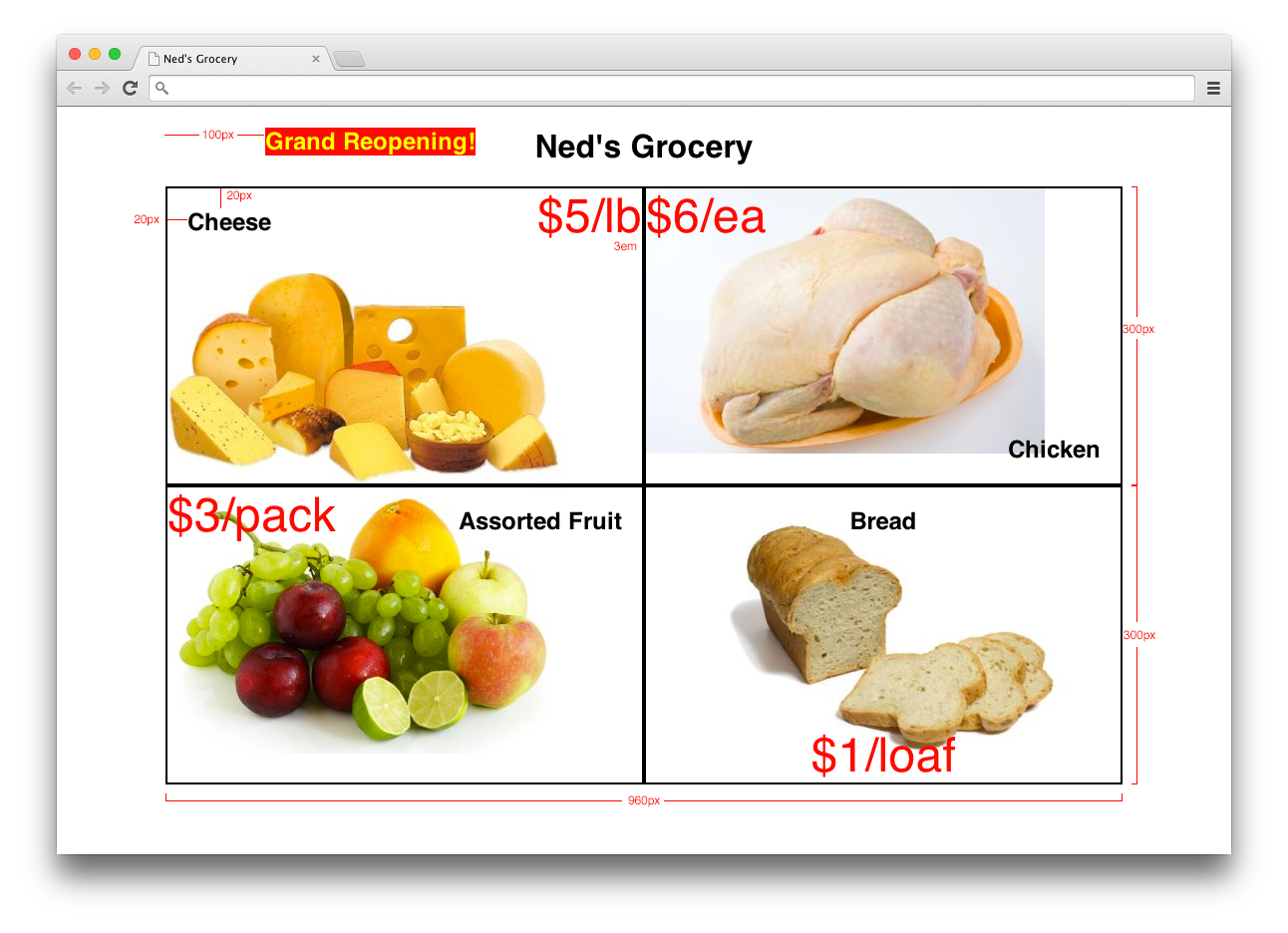
[edit | edit source]We'll focus on positioning of elements: using absolute, relative, or fixed positioning to put the elements anywhere we want on the whole page. We'll use this mockup along with these assets to put together a page that demonstrates positioning.
Lecture video (no recap)
Lecture materials
Class for 2016-11-07: CSS floats & flexbox
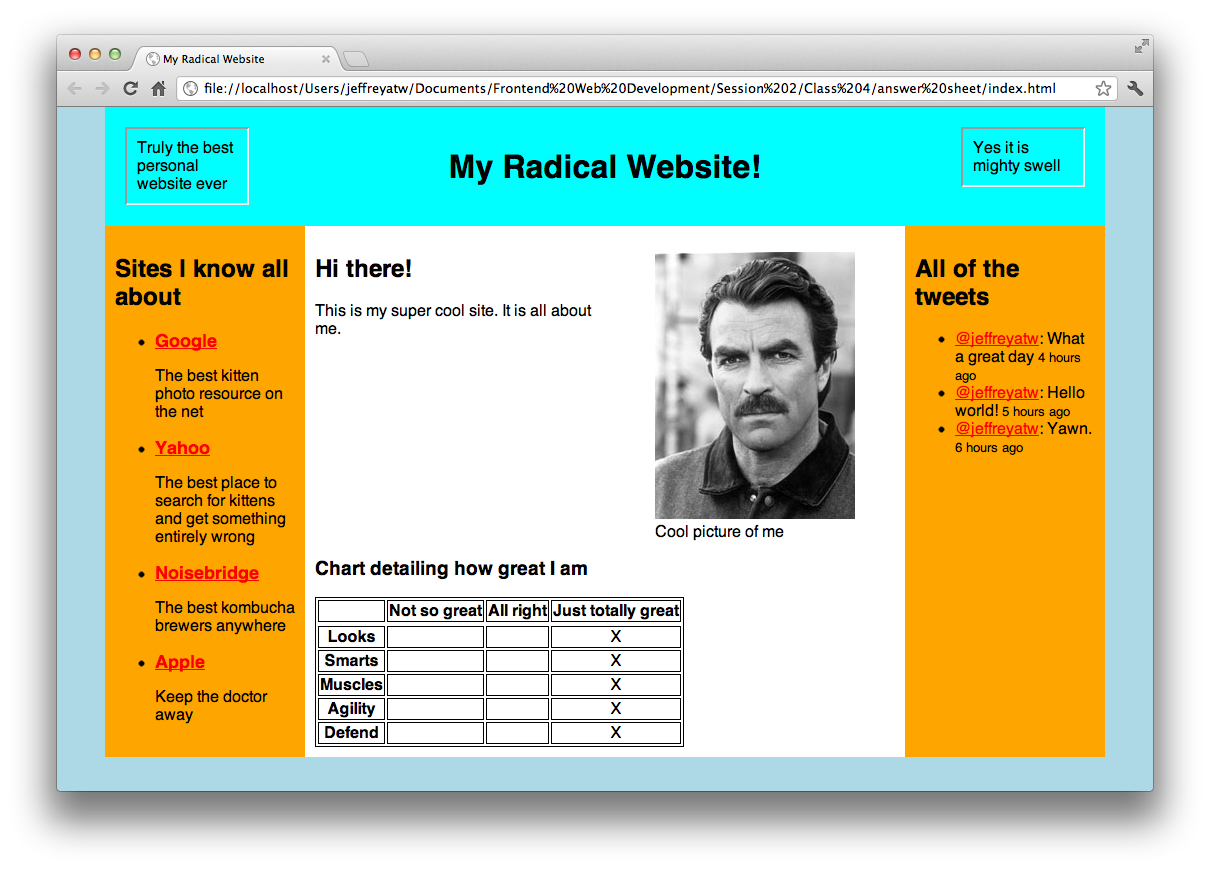
[edit | edit source]Floating and flexbox are two methods behind creating websites with multiple columns, navigation menus, and basically any block element that's stacked horizontally. We'll learn about them by taking a look at some examples, discuss the pros and cons of each, then take a mockup and create a site from it.
Lecture video
Lecture materials
Class for 2016-10-24: Redux
[edit | edit source]We took a look at React last week. There are a few aspects that we could probably optimize, by reducing the amount of props passed between components, and the amount of unnecessary renders. Redux will help us achieve that goal. We'll continue working on the React app we made last week.
To prepare, make sure you have the current version ("Latest Features") of Node.js installed.
Lecture video (no sound until the half hour mark)
Lecture materials
Class for 2016-10-17: React
[edit | edit source]React is a JavaScript UI library that's skyrocketing in popularity. We'll take the NoiseTwitter app we've made in jQuery and Angular and do it again in React, with the help of Create React App which will propel us into a modern JavaScript development environment. This class is an intro on just plain React in the DOM, but the next class will add in additional libraries like Redux, Normalizr, and possibly Reselect.
To prepare, make sure you have the current version ("Latest Features") of Node.js installed.
Lecture video
Lecture materials
Class for 2016-10-10: AngularJS
[edit | edit source]We'll learn about the basics of AngularJS (version 1), a popular client-side MVC application framework. Frameworks such as these make it easier to manage data-rich views by keeping everything in sync with each other. To understand how libraries like AngularJS differ from jQuery, we'll be taking our NoiseTwitter app and converting it from one that uses jQuery into one that uses AngularJS instead.
Lecture video
Lecture materials
Class for 2016-10-03: Forms
[edit | edit source]We'll create a Foundation-based landing page with a sign-up form. We'll learn about built-in HTML5 validation, but also use the jQuery Validation plugin to help us where browser support is necessary.
Lecture video
Lecture materials
Class for 2016-09-26: Ajax
[edit | edit source]We'll talk about Asynchronous JavaScript and XML, a technology that allows us to talk to a server without leaving the page. jQuery makes this easy. We'll add Ajax functionality to the Twitter app. We'll use this PHP file to test it out.
If you don't already have web hosting, please sign up for some at NearlyFreeSpeech.NET for free (or very cheap). Also, install the FileZilla Client.
Lecture video
Lecture materials
Class for 2016-09-19: HTTP, SFTP, and Git-based web hosting
[edit | edit source]We'll talk about file transfer: HTTP, which is the method of getting and sending information in the web browser; SFTP, which is a method of securely uploading files to a web host; and how to use Git to host a site.
We'll set up free web hosting accounts at NearlyFreeSpeech.NET (which you should sign up for now), and upload to them using the FileZilla client (which you should install now).
Class for 2016-09-12: Starting a new project
[edit | edit source]A text editor and web browser are all that's required to begin a project - but how about getting a head start? We'll talk about Foundation, a framework that gives us a head start with laying out a new site.
Lecture video
Lecture materials
Class for 2016-08-29: jQuery, cont'd
[edit | edit source]We'll continue learning about jQuery by focusing on the example we worked on last class. We'll add functionality to it that will make it seem more like the real thing.
Lecture video
Lecture materials
Class for 2016-08-15: jQuery
[edit | edit source]We'll introduce jQuery, a JavaScript library that makes web programming a whole lot easier. jQuery is the most popular of many libraries that allow us to interact with the document easily, while also providing us with a few tools that are missing from the base language.
To learn what jQuery can do, we'll add some scripting to this sample web app.
Lecture video
Lecture materials
Class for 2016-08-08: JavaScript, cont'd
[edit | edit source]We'll continue discussing JavaScript basics: arrays, objects, creating functions, and scopes.
Lecture video
Lecture materials
Class for 2016-08-01: JavaScript
[edit | edit source]We'll talk about JavaScript: making web pages interactive through client-side code. We'll use the console, which is part of the browser's developer tools, to demonstrate the basics of the language. This and next week's class can be treated as a general introduction to programming.
Lecture video
Lecture materials
Class for 2016-01-25: version control (Git) and the command line
[edit | edit source]This class is a general overview on version control and the command line. Most developers collaborate with their peers by using version control systems, which allows them to keep track of their work in a reliable fashion and push it to the web.
Again, this class isn't about web development per se - it's just an important introduction to using the command line to work with Git, one of the most popular version control systems. Everyone will create their own fork of a repository and check in their work.
During the half-hour before the class, we'll help people set up Git on their computers. On OS X, type git in a Terminal to get started. On Windows you should install Git for Windows. Also, please sign up for a GitHub account.
Lecture video
Lecture materials
Class for 2016-07-18: CSS selectors and the box model
[edit | edit source]CSS selectors are probably the most complex part of the CSS language, so we'll look at them further in-depth. We'll also talk about the box model, the display concept that makes words and containers on the web look like they do. All of this will be made easy with browser developer tools, which we'll learn how to use.
Lecture video
Lecture materials
Class for 2016-07-11: the basics
[edit | edit source]THIS is the class to attend if you are a complete beginner! We are starting the curriculum of this class from square one. We'll cover the very basics:
- Explaining "front-end" vs. "back-end"
- Explaining web apps vs. web sites
- Discussing tools of the trade
- Describing the separation between structure, presentation, and behavior
- Writing a basic HTML page
- Styling the page with basic CSS
- Adding a small amount of JS
- Explaining the role of front-end development as a job and career
No recap session for this class. Please show up before 8pm, as physical space is limited. Bring a laptop!
Lecture video
Lecture materials